Start here · a little extra help
A cell is a stitch, not a yarn brand
A chart is a grid showing where the colours go. In this tool, one cell represents one UK double crochet, called single crochet in US terms. Palette letters and numbers identify colours within your project; they are not universal manufacturer shade numbers.
A hex code is a six-character screen-colour reference such as #701689. Use it as a visual guide when choosing real yarn, because screens, lighting and fibres change how colour looks. A colour run tells you how many neighbouring stitches use the same yarn.
Your small practice goal
Choose a tiny picture with two colours. Follow one row using the direction arrow, then check the total stitches against the chart width.
Picture it
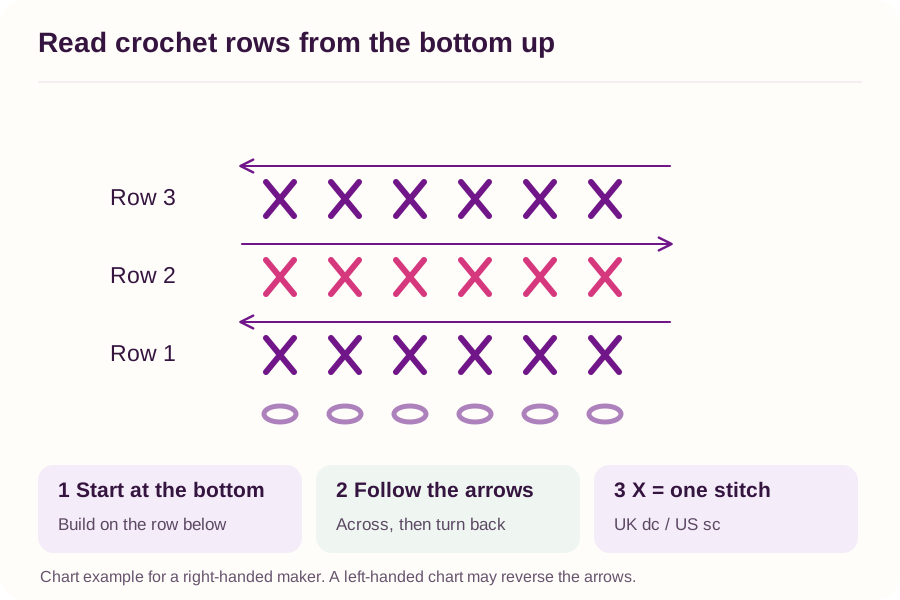
Select the diagram to open it at full size. Use the written steps for the actual hook movements.
Words you’ll meet
No need to memorise these. Keep them nearby and look up a word whenever you need it. This guide uses UK names, with US equivalents explained.
Open the plain-English word guide · 3 terms
UK dc / US sc
UK double crochet is called single crochet in US patterns. They are the same short stitch.
Swatch
A small sample used to practise or to check the fabric, stitch size and washing behaviour.
Gauge / tension
The number of stitches and rows in a measured area. Tension can also mean how firmly you hold the yarn.
Quick note: this guide uses UK crochet names. UK double crochet is US single crochet.
What the tool makes
Micky's Pattern Maker creates a flat colourwork chart using one UK dc (US sc) per coloured cell. It groups similar image colours into a smaller palette. It does not reconstruct a three-dimensional teddy or turn a photograph of a written pattern into instructions.
Prepare a sensible image
- Choose an image you own or have permission to adapt. Keep any required credits with your pattern.
- Crop to the important subject. Try fewer colours and a small chart first, then inspect the face, outline or lettering.
- Match each palette colour to real yarn. A screen's hex code is a colour reference, not a manufacturer's yarn number.
- Swatch in the yarn and stitch method you will use. Enter the measured stitch and row gauge to check the finished proportions.
Follow one row at a time
Use the tool's row direction and colour runs, not your guess about which way the image should be read. The hover or tap inspector shows yarn number, colour and stitch position. Count every row before moving on. The text chart is a second way to see the same colours, not a different pattern.
Keep the useful bits
Save the editable project so you can change it later. The PDF has a complete overview, yarn key and written rows; enlarged chart tiles are optional. Try a small swatch of the design before investing in a large piece. Open Pattern Maker.
Sources & further learning
Original Crochet By Micky practice notes. See the linked lessons for the underlying techniques.
Checked 24 October 2026. Written in UK terms, with US equivalents where useful. Follow a project's own stitch key if it differs. These are original explanations and practice exercises, not copies of the linked publishers' patterns.